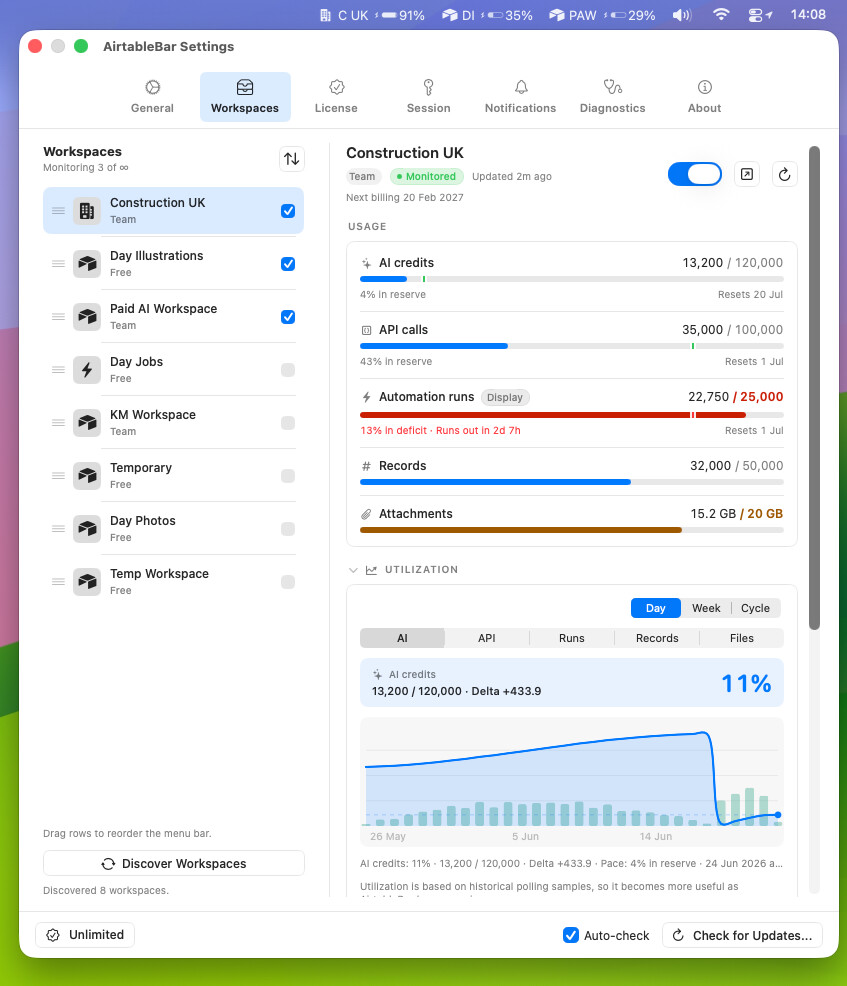
See your Airtable usage move, not just sit there
Airtable shows workspace usage as a number on a settings page. A snapshot. It only changes when you reload the page, and only if you remember to go look.
I wanted to watch it move. So I built AirtableBar.
It lives in your Mac menu bar and refreshes your workspace usage as often as every 30 seconds. Not real time, but close. Almost live.
It shows the current numbers per workspace:
- AI credits
- Public API calls
- Automation runs
- Largest base record count
- Attachment storage
Each one is plan-aware, so you see usage against your limit and the cycle reset date. 12,847 / 15,000, resets in 14 days. The number actually means something.
The part power users seem to like: run an automation, glance up at the menu bar, watch the API calls tick up on the next poll. Fire an AI action, see the credits move. Usage stops being a thing you audit after the fact. It becomes a live gauge you already have open.
No API key. It reads your existing Airtable browser session, so there’s nothing to generate or rotate. Usage history stays on your Mac. No telemetry.